Video editor for iPad and Android tablets — in the browser, no app
The full desktop studio on a tablet: board, multi-track timeline, captions, color and export, driven by touch. Open it in Safari or Chrome — nothing to install.
The studio at tablet size, exactly as it renders: a clip selected on the board, its properties beside the picture, video and music on the timeline underneath.
Open the studio — free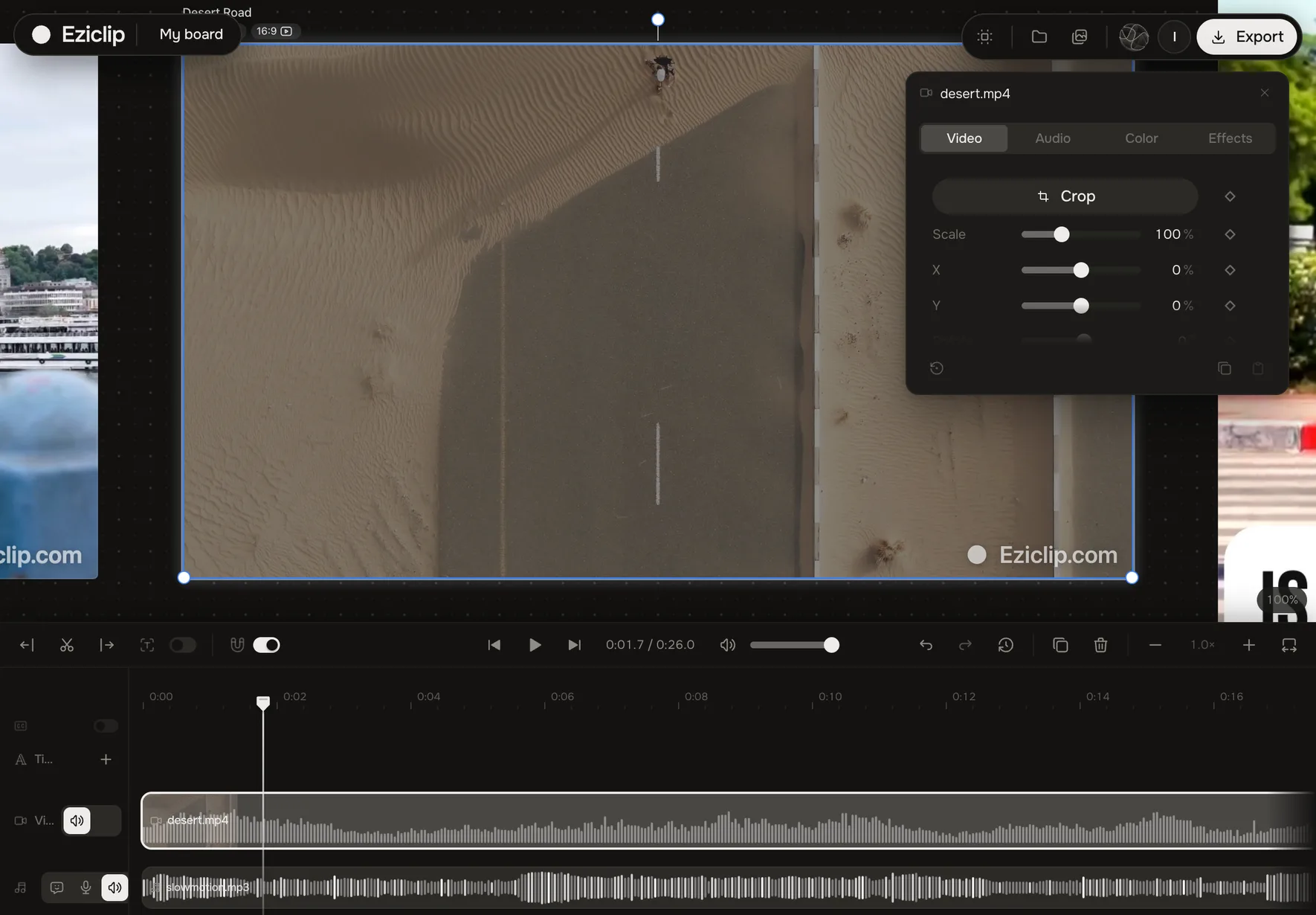
Eziclip Studio is a video editor that runs in a tablet's browser: open eziclip.com/studio in Safari on an iPad or Chrome on an Android tablet and you get the same editor as on a computer — a multi-track timeline, captions, cut by text, titles, color and effects — then export an MP4 straight to Photos or Files. No app to install, no sign-in required to start, and your footage isn't uploaded. On a phone, the same studio has a layout built for a thumb.
The desktop editor, on a tablet screen
A tablet has the room a phone doesn't, so Eziclip Studio gives it the same layout as a laptop: the board with your sheets across the top, the full timeline underneath with every lane visible, and the properties panel beside the picture — Video, Audio, Color and Effects.
Nothing is a tablet edition with features missing. It is the editor you get on a computer, opened in Safari on an iPad or Chrome on an Android tablet.
Driven by touch
One finger pans the board, two fingers zoom it. Tap a clip to select it, hold to pick it up and move it along the timeline, drag its edge to trim. Hold a finger on anything for its menu — the same one a right-click opens on a computer.
A keyboard or a trackpad attached to the tablet works as it does on a laptop, shortcuts included.
Several formats of one video, side by side
The board is where a tablet earns its screen: lay a 16:9 cut, a 9:16 vertical and a square next to each other, duplicate a sheet into another format, and compare them without leaving the page.
Captions, color and effects
Word-timed captions with animation presets, cut by text, titles, stickers, stock clips and sounds are all there. So is the color panel — exposure, contrast, temperature, log footage converted to color — and the film looks under Effects.
Transcription and the final render run in the browser. Your footage isn't uploaded to make captions or to export.
Start on the tablet, finish anywhere
Sign in and your boards sync between devices: rough-cut on the tablet on the couch, open the same board on a computer later. Export renders an MP4 right on the tablet; the share sheet saves it to Photos or Files. Free exports carry a small Eziclip mark in the corner; Plus ($9/month) removes it everywhere.
Which editors work in a tablet browser?
| Editor | On a tablet, in the browser |
|---|---|
| Eziclip Studio | Yes — the full desktop layout in Safari or Chrome, no app |
| CapCut | Yes — CapCut Online in the iPad browser |
| Kapwing | Yes — tablet browser |
| VEED | Yes — mobile browser |
| Canva | The Canva app for iPad and Android tablets |
| Adobe Premiere | A separate Premiere app for iPad |
| Clipchamp | No — tablet browsers unsupported, not built for touch |
| Descript | No — desktop only, no iPad app |
How to edit a video on a tablet
- 1
Open eziclip.com/studio on your tablet
Safari on an iPad, Chrome on an Android tablet — nothing to install, and no account needed to start.
- 2
Add your clips
From Photos, Files or the camera — they land on the timeline in order.
- 3
Cut with your fingers
Tap a clip to select it, drag its edge to trim, hold to move it. Pinch the board to zoom.
- 4
Add captions, titles and color
Everything sits in the panel beside the picture, the same as on a computer.
- 5
Export and save
Render the MP4 and save it to Photos or Files from the share sheet.
Questions
Yes. Eziclip Studio runs in Safari on an iPad — open eziclip.com/studio and you get the full editor with a multi-track timeline, captions, color and export. There's no app to download and no sign-in required to start.
Yes — open eziclip.com/studio in Chrome on an Android tablet. It is the same editor as on a computer, controlled by touch.
No. A tablet gets the same layout and the same tools as a laptop — the board, the full timeline and the properties panel. Phones get a layout built for a thumb instead.
CapCut Online, Kapwing and VEED run in a tablet's browser. Clipchamp's editor doesn't support tablet browsers and isn't built for touch, Descript is desktop only, and Canva and Adobe Premiere ship tablet apps instead. Eziclip Studio runs in the tablet's browser with the full desktop layout.
An iPad on iPadOS 26 or newer, in Safari or Chrome. On Android, a recent tablet with Chrome.
Yes — free to use, with a small Eziclip mark in the corner of free exports. A flat $9/month Plus subscription removes it across every tool.
No. Editing, transcription and the final render run in your browser, and nothing you make is used to train an AI model.